

Editdesk

Free · MIT licence

Editdesk changes the words on your page without the AI

Editdesk opens your page in the browser with a small toolbar. Click any text, type the new words and press Enter, and the change is saved to the file the words came from. It has no AI in it, so a change uses no credits.

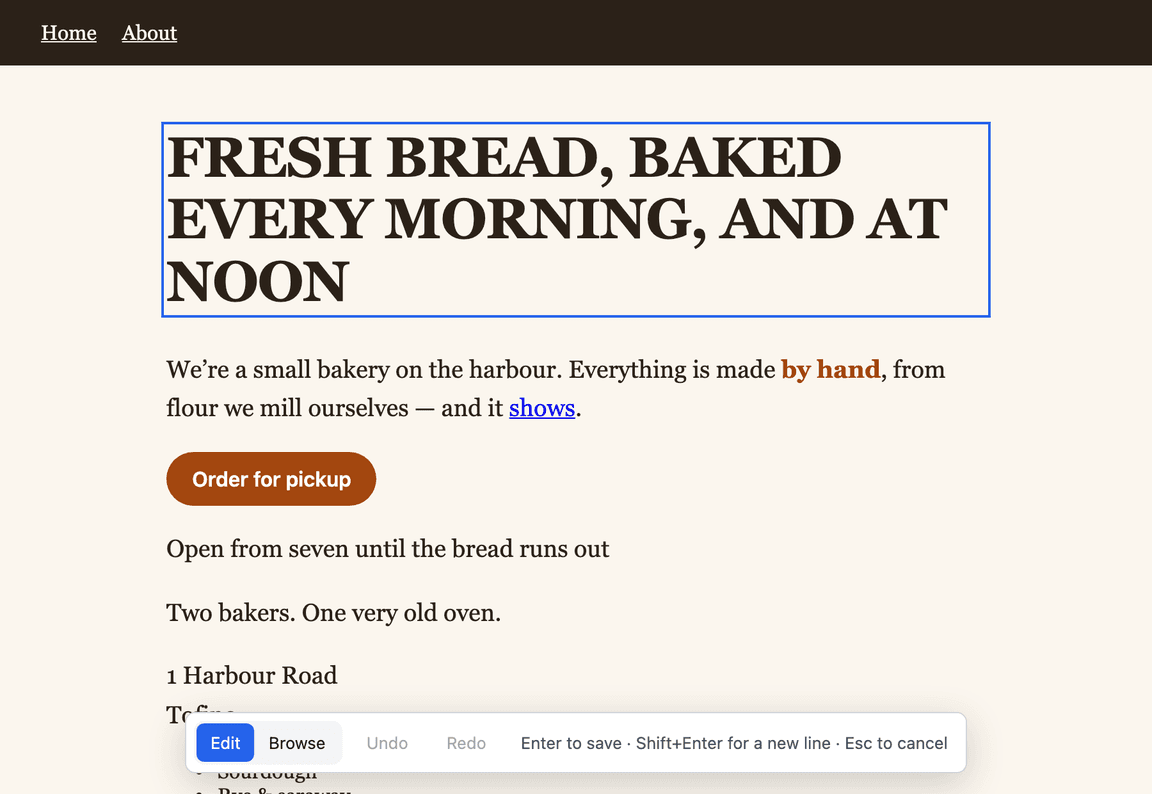
A bakery page open in Editdesk: the heading is selected for editing and the toolbar at the bottom says Enter to save, Shift+Enter for a new line, Esc to cancel

The one-word problem

Changing one word through the AI costs a prompt, a wait and credits.

When an AI built your page, every change goes back through the AI, including changing "Sign up" to "Join".

With Editdesk, you edit the words in the page itself and it writes exactly those characters into the file they came from.

  1. 1. Point it at the page

    A file, a folder, or your app running on localhost.

    $ npx editdesk page.html
  2. 2. Click the text and retype it

    In the page's own font and size, in place. Shift+Enter for a new line, twice for a new paragraph. Esc puts it back.

  3. 3. Press Enter

    The toolbar says which file and line it saved to. Undo puts it back.

  • It finds the words in your sourceIn an app, it changes the text in the source file it came from, strings files included. If the same words are in two places, it asks which one.
  • Adds nothing to your projectNo dependency, no config, no script tag. It writes a file only when you save.
  • Works offline once installedIt runs on your computer and sends nothing anywhere. macOS, Windows and Linux, with Node.js 20.19 or newer.

It changes words, not formatting. Bold and links stay as they are.

Link to up-coast.github.io

Editdesk

Command-line tool on npm · MIT licence · Node.js 20.19 or newer

Get Editdesk and join my list

I add you to my email list. I write when I release a new free tool, when I need beta testers, and when I have something for sale. Every email has an unsubscribe link.

Get Editdesk without joining

You give me no name and no email, and I can't see who you are. The install page opens in a new tab. You can join the list later from the footer of any page.

Open the Install Page →

Install

Try it without installing: npx editdesk page.html. To keep it: npm install --global editdesk, then editdesk page.html from any folder. The documentation covers a folder, a dev server and what happens to your source.

Licence

MIT. You can use it, change it and include it in work you sell.